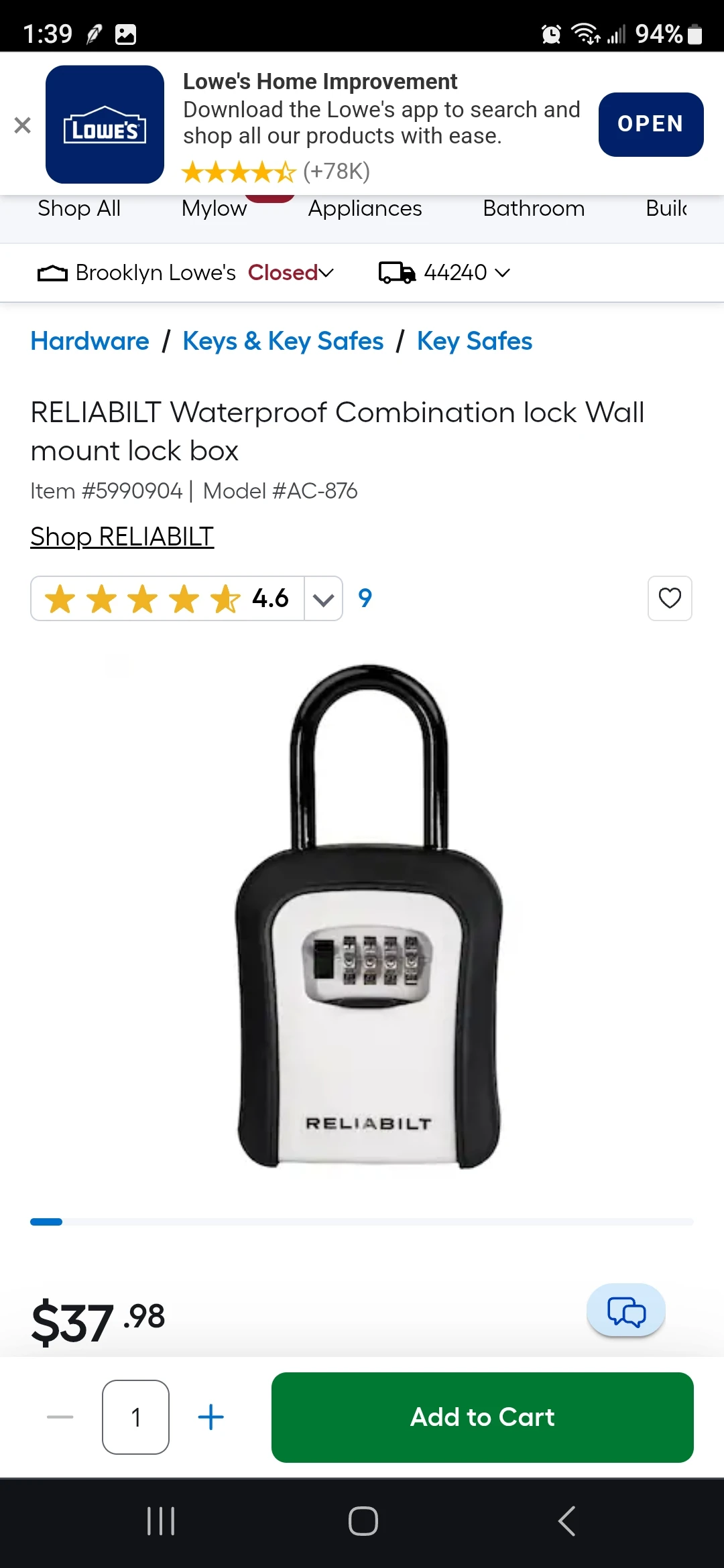
RELlABILT Lock Box
To reset your RELlABILT lock box code: open the box using your current combination (default is usually 0-0-0-0), locate the reset lever or button inside the lock box (typically on the back of the door or near the dial), slide or press it to the reset position, set your new 4-digit combination on the dials, then return the reset lever to its original position. Always test the new code several times before closing to ensure it works correctly.
Understanding Your RELlABILT Lock Box
Key Visual Components
Most RELlABILT lock boxes feature these standard elements: Combination Dial: The front-facing dials with numbers 0-9 (typically 4 dials for a 4-digit code). Some models use letters instead of numbers, or a combination of both. Reset Lever/Button: Located inside the lock box, usually on the back of the door panel or near the locking mechanism. This is typically a small sliding lever, push button, or pin that must be moved to enable code changes. Shackle or Mounting Hardware: The metal loop or mounting plate that attaches the lock box to doors, gates, or railings. Key Storage Compartment: The interior space where you store keys or other small items.Common RELlABILT Lock Box Models
While specific models may vary slightly, most RELlABILT lock boxes follow similar reset procedures: Wall-Mount Models: Permanently mounted to doors or walls, popular for rental properties and real estate showings. Shackle Models: Portable lock boxes with a metal loop that hooks over door handles, railings, or gates. Combination Styles: 4-digit numeric, 3-digit numeric, or alphanumeric (letters and numbers) combinations.How to Reset Your RELlABILT Lock Box Code
Method 1: Standard Reset Process (Most Common)
This method works for the majority of RELlABILT lock box models. What you'll need: * Your current combination code * A small flathead screwdriver or the included reset tool (optional, for some models) * Pen and paper to record your new code Step-by-Step Process: Step 1: Open the lock box using your current combination Align the dials to your existing code. If this is a brand new lock box, the factory default is usually 0-0-0-0 (four zeros). Some models may use A-A-A-A or 1-2-3-4—check your manual if 0-0-0-0 doesn't work. Pull the shackle or open the door to access the interior. Step 2: Locate the reset mechanism Look inside the lock box for the reset lever, button, or pin. Common locations include: * Back of the door panel (most common) * Side wall of the interior compartment * Near or behind the combination dial mechanism * On the locking shackle assembly The reset mechanism is usually labeled or a different color (often gray, silver, or yellow) to distinguish it from other components. Step 3: Activate reset mode For sliding levers: Slide the lever from position "A" to position "B" (or from one end to the other). You may need to apply slight pressure. For push buttons: Press and hold the reset button while proceeding to the next step. For rotating pins: Turn the pin 90 degrees or push it inward, depending on your model. Some models require a small tool (like a paperclip or the included reset tool) to access recessed reset mechanisms. Step 4: Set your new combination While the reset mechanism is activated, turn the front dials to your desired new code. Choose a code that is: * Memorable to you but not obvious to others * Not a common pattern (avoid 1-2-3-4, 0-0-0-0, or your birth year) * Not related to information visible on your property (house number, etc.) Make sure each dial clicks firmly into place and is perfectly aligned. Step 5: Secure the new combination For sliding levers: Slide the lever back from position "B" to position "A." For push buttons: Release the button once your new code is set. For rotating pins: Return the pin to its original position. Step 6: Test the new code (CRITICAL) Before closing the lock box completely, test your new code at least 3-4 times: 1. Scramble the dials to random numbers 2. Enter your new code carefully 3. Verify the lock box opens 4. Repeat this process 2-3 more times This confirms your new code is properly set before you rely on it. Step 7: Record your code securely Write down your new combination and store it in a secure location: * Password manager app * Secure notes on your phone * Locked file cabinet or safe * Never on a label attached to the lock box itself Core Takeaway: Always refer to your specific model's manual, as steps may vary slightly. The general principle remains the same: open first, activate reset mode, set new code, deactivate reset mode, then test thoroughly.Method 2: Digital or Electronic Lock Box Reset
Some newer RELlABILT models may feature digital combinations or smart features. For electronic models: 1. Access the programming mode (usually by holding a specific button) 2. Enter the master code or current code 3. Follow on-screen prompts or specific button sequences 4. Set new code when prompted 5. Confirm and testTroubleshooting Common Issues
Forgot Your Current Code
This is the most common problem and unfortunately the most difficult to solve. For mechanical lock boxes (no master reset): If you've completely forgotten your code and the lock box is closed, your options are limited: Try default codes first: * 0-0-0-0 (most common default) * 1-2-3-4 * A-A-A-A (for letter models) Systematic combination testing: For a 4-digit lock box with 10 numbers (0-9), there are 10,000 possible combinations. While tedious, you can systematically work through combinations starting at 0-0-0-0 and proceeding in order. This typically takes 15-30 minutes if done methodically. Contact the manufacturer: RELlABILT customer service may be able to help if you have proof of purchase and can verify ownership. They might provide a master reset code or procedure. Last resort - replacement: If you cannot recover your code and the lock box won't open, you may need to cut it off and replace it. This should be a last resort after exhausting all other options.New Code Doesn't Work After Reset
Possible causes and solutions: Dials weren't aligned properly: When setting your new code, ensure each dial clicks firmly into position and numbers are perfectly centered. Misalignment by even a millimeter can prevent the lock from opening. Reset lever not fully engaged: Make sure you properly moved the reset mechanism to the reset position before changing codes. Accidentally scrambled dials during reset: If you bumped the dials while moving the reset lever back, your actual code may be different from what you intended. Try variations of numbers adjacent to your intended code. Reset lever not returned to locked position: Ensure you moved the reset mechanism back to its original position after setting the new code.Reset Mechanism is Stuck or Won't Move
Solutions: Apply lubricant: Use a small amount of graphite lubricant (not WD-40, which can gum up over time) on the reset mechanism if it's stiff. Use appropriate tool: Some reset mechanisms require a thin, flat tool to push or slide. Try a small flathead screwdriver or the included reset tool. Check for obstructions: Ensure nothing is blocking the movement of the reset lever inside the lock box.Lock Box Won't Open Even With Correct Code
Troubleshooting steps: Verify dial alignment: Make absolutely certain each number is perfectly aligned with the indicator mark. Try slight variations: Test one number higher or lower on each dial in case the mechanism has shifted slightly. Check for mechanical failure: If the locking mechanism is jammed or broken, the lock box may need replacement. Test in different conditions: Temperature extremes can affect mechanical locks. If it's very cold, warm the lock box slightly and try again.Security Best Practices for Lock Boxes
When to Change Your Code
Change your lock box code: * After any contractor or service person uses it * Every 3-6 months as routine maintenance * When moving into a new property * After a guest checkout (for Airbnb/rental properties) * If you suspect your code has been compromised * When terminating access for former employees or tenantsChoosing a Secure Combination
Avoid these common codes: * Sequential numbers (1-2-3-4, 4-3-2-1) * Repeated digits (1-1-1-1, 7-7-7-7) * Birth years or dates visible on your property * House number or address digits * Phone number digits * Common patterns (2-4-6-8, 1-3-5-7) Choose better codes: * Random combinations with no obvious pattern * Codes meaningful only to you (but not obvious biographical information) * Mix of high and low digits * Avoid all same or sequential numbersPhysical Security Measures
Mount securely: Ensure your lock box is attached to something solid that cannot be easily removed or broken. Position strategically: Place lock boxes in locations visible from the street (deters tampering) but not prominently advertising "keys inside here." Regular inspection: Check monthly for signs of tampering, damage, or weather wear. Replace if compromised. Limit who knows the code: Only share with people who absolutely need access. The more people who know, the less secure it becomes. Don't write codes on the box: Never label your lock box with codes, hints, or identifying information.The Practitioner's Reality Check
Frequently Asked Questions
How do I find the reset button on my RELlABILT lock box?
The reset lever or button is usually located inside the lock box on the back of the door panel or near the combination mechanism. Open the box using your current code, then look for a small sliding lever, push button, or rotating pin—often labeled or colored differently (gray, silver, or yellow) from surrounding components.
Can I reset my RELlABILT lock box without the current code?
No, you typically need the current combination to open the lock box before resetting. If you've forgotten your code, try default combinations (0-0-0-0, 1-2-3-4), systematic combination testing, or contact RELlABILT customer service with proof of purchase for assistance.
What is the default code for a new RELlABILT lock box?
Most new RELlABILT lock boxes come with a factory default code of 0-0-0-0 (four zeros). Some models may use 1-2-3-4 or A-A-A-A for letter-based models. Always check your user manual for your specific model's default code.
What if I make a mistake during the reset process?
If you encounter issues, restart the process from the beginning. Open the lock box with your current code, carefully follow each step, and ensure you test the new code thoroughly before closing. If the new code doesn't work, the most common cause is misaligned dials—make sure each number clicks firmly into position.
How often should I change my lock box code?
Change your code every 3-6 months as routine maintenance, immediately after sharing access with contractors or guests, when moving to a new property, or whenever you suspect your code may have been compromised. For rental properties, change between each guest stay.
Can I use any combination I want?
Yes, but avoid obvious patterns like 1-2-3-4, repeated digits like 1-1-1-1, birth years, house numbers, or phone number digits. Choose random combinations that are memorable to you but not easily guessed by others.
What if my reset lever won't move?
Try applying a small amount of graphite lubricant to loosen stuck mechanisms. Ensure you're using appropriate tools (small flathead screwdriver or included reset tool) and applying pressure in the correct direction. If the mechanism is broken, you may need to replace the lock box.
How do I know if my new code is set correctly?
Before closing the lock box, test your new code 3-4 times. Scramble the dials, enter your new code, verify it opens, then repeat. This confirms the code is properly set before you rely on it.
What should I do if I'm locked out completely?
First try default codes (0-0-0-0, 1-2-3-4). If unsuccessful, systematically test combinations starting from 0-0-0-0 and working upward—this takes 15-30 minutes but often succeeds. Contact RELlABILT customer service with proof of purchase, or as a last resort, cut off the lock box and replace it.
Can I get a master reset code from RELlABILT?
Most mechanical RELlABILT lock boxes don't have universal master reset codes for security reasons. However, RELlABILT customer service may assist if you can prove ownership and provide your model information and proof of purchase. Electronic models may have manufacturer reset procedures.


