Fixes might be blogged to help others — your data stays safe.
Fixing Bambu Lab A1 3D Printer Issues
Published: 3/21/2026
Fixing Bambu Lab A1 3D Printer Issues
The Bambu Lab A1 3D printer is experiencing issues with poor print quality, specifically stringing and rough texture. To fix this, check and adjust the printer's temperature settings, ensure proper filament handling, and calibrate the printer.
Key Takeaways
Check temperature settings to prevent stringing
Ensure proper filament handling to avoid contamination
Calibrate the printer for optimal performance
Adjust print speed and acceleration for better quality
Regularly maintain the printer to prevent wear and tear
The Hard Truth About Bambu Lab A1 3D Printer Issues
The Bambu Lab A1 3D printer is a powerful tool for creating complex objects, but like any machine, it's not immune to issues. One common problem users face is poor print quality, characterized by stringing, rough texture, and other defects. In this guide, we'll walk you through the diagnostic process and provide actionable steps to resolve these issues.
The Professional Reality
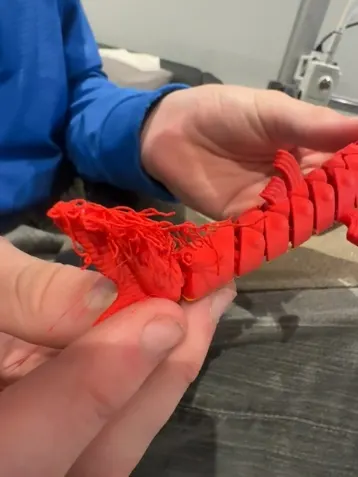
The image shows a person holding a poorly printed 3D object with significant stringing and rough texture. The print appears to have been done with red filament. The printer's build plate and extruder are likely in good condition, but the print settings may need adjustment.
Implementation Guide
To fix the Bambu Lab A1 3D printer issues:
1. Calibrate the printer: Ensure the printer's extruder and build plate are properly calibrated.
2. Adjust temperature settings: Check and adjust the temperature settings to prevent stringing.
3. Check filament handling: Ensure proper filament handling to avoid contamination.
4. Optimize print settings: Adjust print speed and acceleration for better quality.
The Core Takeaway: Proper calibration and temperature control are crucial for optimal print quality.
Learn more about 3D printer calibration
The Practitioner’s Reality Check
The Counter-Intuitive Insight: Many users overlook the importance of regular printer maintenance, which can lead to decreased performance and poor print quality.
The Common Trap: Users often blame the printer's quality or firmware, when in fact, simple adjustments to print settings and calibration can resolve issues.
Frequently Asked Questions
Why is my Bambu Lab A1 3D printer producing stringy prints?
Stringing is often caused by incorrect temperature settings or improper filament handling.
How do I calibrate my Bambu Lab A1 3D printer?
Refer to the printer's manual or online resources for step-by-step calibration instructions.
What are the common causes of poor print quality?
Common causes include incorrect temperature settings, improper filament handling, and poor calibration.
How can I prevent stringing in my 3D prints?
Adjust temperature settings, use proper filament handling techniques, and calibrate the printer regularly.
What are the benefits of regular 3D printer maintenance?
Regular maintenance can improve print quality, reduce wear and tear, and prevent issues.
How often should I calibrate my 3D printer?
Calibrate your printer every 1-3 months, or as recommended by the manufacturer.